Bring your own CLI
to a focused coding workspace.
Run any AI coding agent — Claude Code, Codex, Gemini, Aider, Goose — side-by-side with a live browser and your project files. Point at what needs fixing, not paste screenshots.
macOS & Linux builds coming soon · v0.1.12
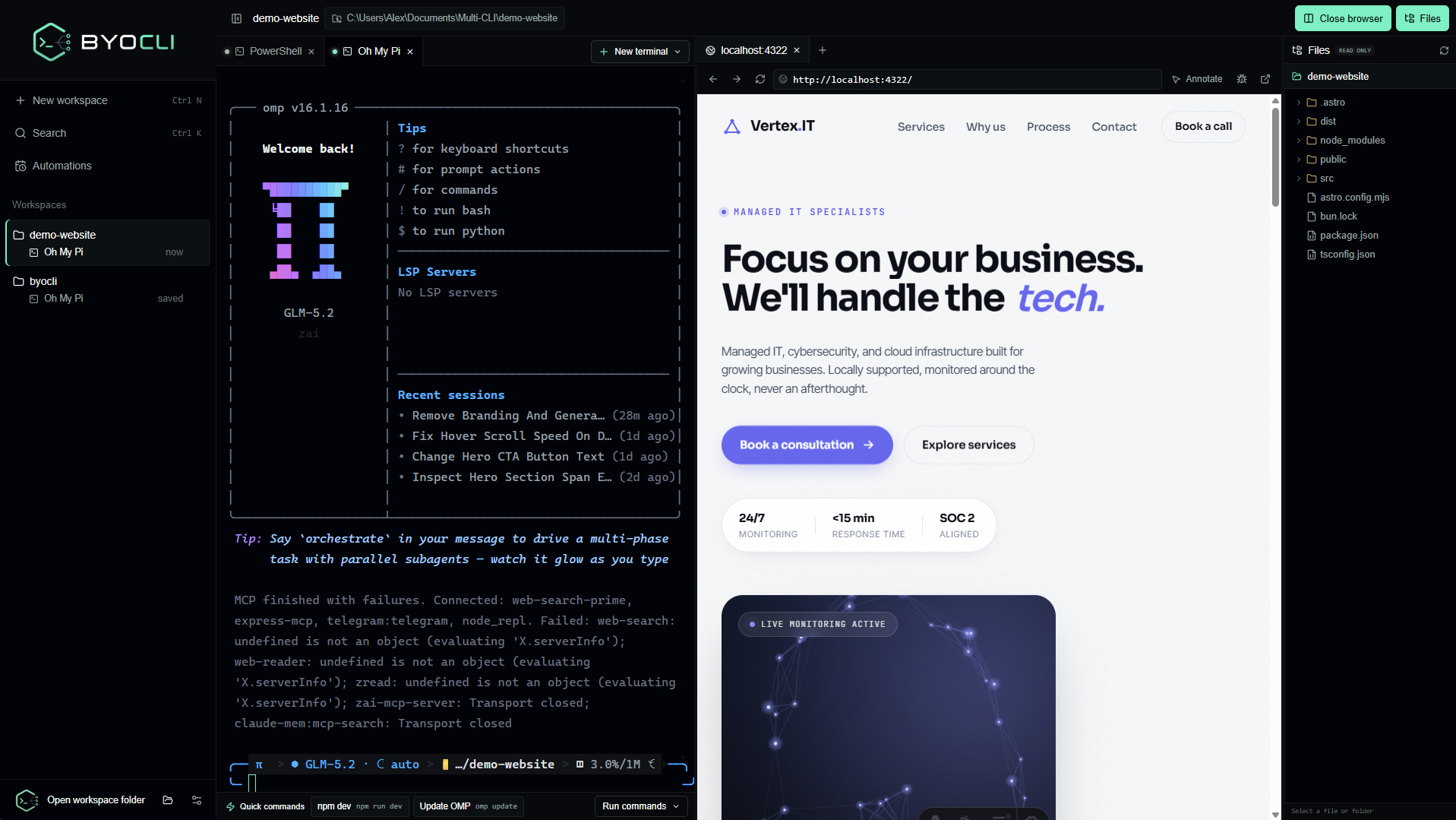
A focused shell for AI coding agents
BYOCLI doesn't pick your CLI for you. It gives every agent a persistent home, a live view of what it's building, and a way to talk about pixels without pasting.
Any CLI, any agent
Claude Code, Codex, Gemini, Aider, Goose, OpenCode — or your own. Profiles auto-detect when you launch an agent, and BYOCLI restores native session history via --continue and --resume.
Point, don't paste
The browser split isn't just a preview. Click Annotate, highlight any element, and BYOCLI pastes a structured instruction — selector, XPath, bounds, nearby text — straight into your agent.
Live browser, native
A real OS webview (WebView2 / WKWebView / WebKitGTK) running beside your terminals — not a separate window. Multi-tab, navigation, DevTools, media muted by default.
Workspace-scoped
Each workspace is a real folder with its own terminals, browser tabs, and history. Switch projects without losing your place. State persists across restarts in SQLite.
Schedule the boring stuff
Run commands on interval, daily, weekly, or cron. Overlap policies, timeouts, retries, and full output capture. Run in a workspace or a file-free temp sandbox.
Open source, GPL-3.0
Free to use and modify — and anything built on BYOCLI must stay open too. No vendor lock-in, no telemetry, no account. Just a focused desktop tool.
From clone to fix in three steps
- 01
Pick a CLI
Choose a profile — Claude Code, Codex, Gemini, Aider, or your own command. BYOCLI launches it in a real PTY with native session restore.
> claude ✓ Restored session · 3 files in context - 02
Open a workspace
BYOCLI scopes every terminal, browser tab, and automation to the folder you pick. Switch projects instantly; state persists in SQLite.
workspaces/ ├── byocli-app (active) └── personal-site - 03
Point at what to fix
Click Annotate in the browser split, highlight the element, describe the change. BYOCLI sends a structured instruction to your agent — no more screenshots.
1. Increase this heading's size
   CSS: main > h1.hero-title
   XPath: /html/body/main/h1[1]
Get BYOCLI
Grab the latest Windows installer, or build from source on any platform. Tauri 2 supports Windows, macOS, and Linux.
Download the NSIS installer and run it. Installs to your user profile — no admin required.
Download latest releaseClone the repo and build for Windows, macOS, or Linux.
git clone github.com/be9hop/byocli
cd byocli
npm install
npm run tauri dev
Pre-built macOS and Linux binaries are on the roadmap. See the build guide for platform prerequisites.
Frequently asked questions
Is BYOCLI free?
Yes. BYOCLI is free and open source under the GPL-3.0 license. You can use it, modify it, and distribute it — and anything you build on top must also stay open source.
Which AI coding agents does it support?
Any command-line tool. BYOCLI ships sensible defaults for Claude Code, Codex, Gemini CLI, Aider, Goose, Oh My Pi, and OpenCode, and you can add your own profile for anything else. If it runs in a terminal, it runs in BYOCLI.
How is this different from a regular terminal?
BYOCLI pairs your terminals with a live browser view and a file tree in the same window. You can visually point at an element on a page — BYOCLI captures its CSS selector, XPath, and surrounding context — and paste that structured instruction straight into your agent session. No more screenshots.
Does my code leave my machine?
No. BYOCLI is a desktop app that runs locally. Your terminals, files, and the browser view all stay on your machine. The agents you run (Claude Code, Codex, etc.) behave exactly as they would in any other terminal — BYOCLI doesn't intercept or relay their traffic.
What platforms does it run on?
Windows today, with a polished NSIS installer. macOS and Linux are supported by the underlying Tauri framework and are on the roadmap — you can also build from source on those platforms now.
Can I schedule commands to run automatically?
Yes. BYOCLI has a built-in automation scheduler supporting interval, daily, weekly, and cron schedules. Automations run in a workspace or a file-free temp sandbox, with overlap policies, timeouts, retries, and full output capture in the run history.
Where does my workspace state get saved?
Locally, in a SQLite database inside your OS app-data directory. BYOCLI persists your workspaces, sessions, automation history, and settings. Nothing is sent to a server.